Access Control Readers
ASL-X5 RFID & Password Access Control Keypad, 10,000 Users Capacity Standalone Door Access Control System with Data Copy Function
From ฿220
Type
฿220
In stock (99 available)
Product Overview
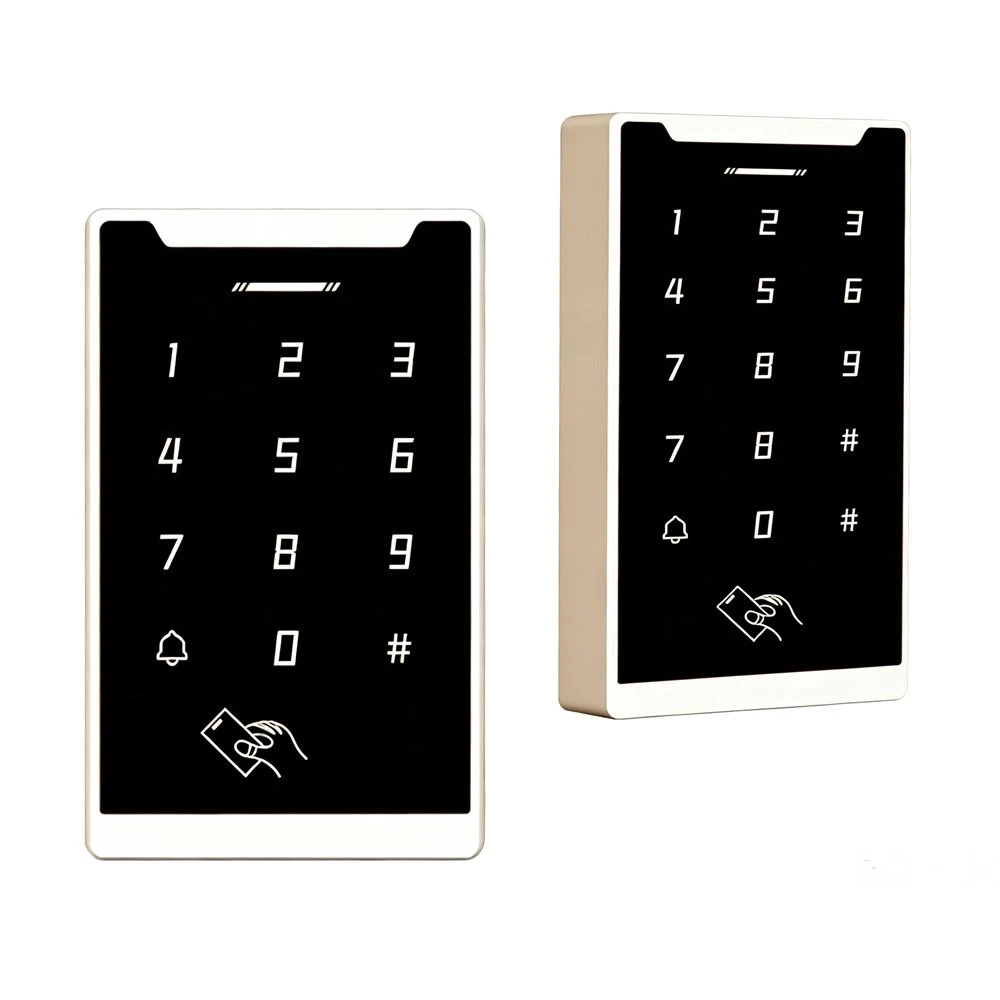
The ASL-X5 is a versatile and secure standalone access control keypad reader that supports IC/ID card and password authentication. It features a rugged ABS flame-retardant housing, a built-in doorbell button, and a large 10,000-user capacity. The device supports multiple access modes (card, password, card+password, NFC) and offers advanced programming features including master card management, data copying between identical units, and configurable relay output time. The keypad is backlit with a clear digital layout and an LED working indicator for straightforward operation.
Key Features
Large User Capacity: Supports up to 10,000 user credentials (cards and/or personal passwords).
Multiple Access Methods: Offers flexible access options including IC/ID card, numeric password, card+password, and NFC (for IC models).
Adjustable Relay Output Time: Programmable unlock time from 0 to 99 seconds; setting to "00" provides a momentary 0.2-second pulse.
Configurable Access Modes: Supports card only, card or password, card + password, and password only modes.
Master Card Support: Allows creation of dedicated "add" and "delete" master cards for rapid user management.
Data Copy Functionality: Enables direct data transfer between two ASL-X5 units via wired interconnection, simplifying device replacement or duplication.
WG26/34 Output: Compatible with standard Wiegand interfaces for integration with external controllers.
Normally Open/Normally Closed Mode: Supports fail-safe or fail-secure lock configurations.
Durable Construction: Industrial-grade ABS material is flame-retardant and heat-resistant.
Read Range: 1-15 cm for cards.
Input Voltage: DC 12V–24V with a maximum operating current of ≤100mA.
Operating Environment: Temperature 0°C to 60°C, relative humidity 20%–90%.
How to Use
Change Programming Password (Factory default: 123456): Press [#] + [Current Programming Password] + [#] + [0] + [New 3-6 Digit Password] + [#] + [New Password Again] + [#].
Add User Card: Press [#] + [Programming Password] + [#] + [1] + [Read Card] + [#]. To add multiple cards, simply present each card consecutively.
Add or Change Public Access Password: Press [#] + [Programming Password] + [#] + [21] + [New Password] + [#]. Note: Only one public password can be set.
Add Personal Access Password: Press [#] + [Programming Password] + [#] + [22] + [New Password] + [#]. Multiple personal passwords can be added.
Add Card + Password User: Press [#] + [Programming Password] + [#] + [3] + [Read Card] + [New Password] + [#].
Delete All Users (cards and personal passwords, but NOT public password): Press [#] + [Programming Password] + [#] + [40] + [0000] + [#].
Delete User by Card: Press [#] + [Programming Password] + [#] + [41] + [Read Card] + [#]. To delete multiple cards, present them consecutively.
Delete User by Personal Password: Press [#] + [Programming Password] + [#] + [44] + [Personal Password] + [#]. This removes both the password and the associated card.
Delete All Password-Only Users: Press [#] + [Programming Password] + [#] + [45] + [1111] + [#].
Adjust Relay Unlock Time: Press [#] + [Programming Password] + [#] + [5] + [XX] + [#] (XX = 00-99 seconds).
Set Access Mode: Press [#] + [Programming Password] + [#] + [6] + [XX] + [#] (XX = 01 for card only, 02 for card or password, 03 for card+password, 04 for password only).
Configure WG26/34 Output: Press [#] + [Programming Password] + [#] + [6] + [XX] + [#] (XX = 05 for WG26, 06 for WG34).
Enable Auto-Add Card Mode: Press [#] + [Programming Password] + [#] + [6] + [07] + [#]. In this mode, swiping any new card will add it to the system and trigger the door unlock.
Set Electrical Switch Mode (Normally Open/Closed): Press [#] + [Programming Password] + [#] + [8] + [XX] + [#] (XX = 01 for Normally Closed, 02 for Normally Open).
Add Management Cards (Add/Delete Master Cards): Press [#] + [Programming Password] + [#] + [9] + [1] + [Swipe Add Master Card] + [Swipe Delete Master Card] + [#].
Copy User Data to Another ASL-X5 Unit: Ensure both devices are powered off. Connect terminal "DO" of Device A to "OPEN" of Device B, and "OPEN" of Device A to "DO" of Device B. Power both devices on. On Device A (source), enter programming: [#] + [Programming Password] + [#] + [866] + [#]. Both units will flash green LEDs and emit a long beep when the copy is successful.
Factory Reset: Press [#] + [Programming Password] + [#] + [8] + [99] + [#].
Applications
Suitable for offices, residential buildings (apartments, villas, gated communities), commercial premises, warehouses, schools, and other facilities requiring secure and convenient electronic access control. Ideal for both indoor and outdoor installation on doors, gates, or turnstiles where management of a large number of users is needed.
FAQ
Q: What is the default programming password?
A: The factory default programming password is 123456.
Q: How many users can the ASL-X5 store?
A: The device supports up to 10,000 user credentials.
Q: Can I open the door with my phone?
A: Yes, for IC models, the device supports NFC-enabled mobile phones for door access.
Q: What is the difference between IC and ID models?
A: IC models operate at 13.56MHz and are compatible with Mifare Classic (MF1) cards and NFC. ID models operate at 125kHz and use EM format proximity cards. The device must match the card type you are using.
Q: Can I use both a card and a password together to open the door?
A: Yes, you can enable "Card + Password" mode using the programming instructions, or add a specific user with both a card and a password by using the "Add Card+Password User" command.
Q: What happens if I forget my programming password?
A: You must perform a factory reset using the procedure: [#] + [123456] + [#] + [8] + [99] + [#]. This will reset the programming password to the default 123456 and clear other settings.
Q: Does the device support Wiegand output?
A: Yes, it can be configured to output either WG26 or WG34.
Q: Can I copy user data from one ASL-X5 to another?
A: Yes, the ASL-X5 supports direct data copying between two identical units using a wired connection and the programming command [#] + [Programming Password] + [#] + [866] + [#] on the source device.
Q: What is the "auto-add card" mode?
A: In this mode (enabled by programming command), swiping an unregistered card will automatically add it to the system and unlock the door at the same time, simplifying user enrollment.
Q: Can the device be used with a doorbell?
A: Yes, the unit has a built-in doorbell button with dedicated wiring terminals for connecting an external doorbell.
Q: What type of lock can this device control?
A: It can control both fail-safe (NO) and fail-secure (NC) electric locks. The device provides relay outputs (NO, COM, NC) and also has a "PUSH" input for a wired exit button.
Q: Is the device weatherproof?
A: While the housing is made of durable ABS material, the device is recommended for indoor or sheltered installation.
Q: Why is the relay output time setting important?
A: It determines how long the door lock remains energized after a valid credential is presented. For automatic doors or turnstiles, a shorter time or the momentary pulse (00) is often used; for standard magnetic or electric strike locks, a longer time (e.g., 3-5 seconds) is typically required.
Q: Can I set a public password that works for everyone?
A: Yes, you can set a single public password using the programming command. This password is not deleted by the "Delete All Users" command.
Q: What is the difference between "Delete All Users" and "Delete All Password-Only Users"?
A: "Delete All Users" removes all cards and personal passwords, but leaves the public password intact. "Delete All Password-Only Users" specifically removes only users who have been added with personal passwords, without deleting card-based users.
Q: How do I reset the device to factory defaults completely?
A: Use the factory reset command: [#] + [Current Programming Password] + [#] + [8] + [99] + [#]. This will reset all settings, including programming password, access modes, and user data, to factory defaults.
Q: Can I use this device with an external access control panel or third-party controller?
A: Yes, the ASL-X5 can be configured as a Wiegand reader (WG26/34) and output card data to an external controller via the D0/D1 terminals.
Q: What is the purpose of the master cards (add/delete cards)?
A: Master cards allow rapid user enrollment and deletion without requiring the programming password. An "Add Master Card" can be used to add new users by simply presenting the new card followed by the master card, while a "Delete Master Card" can similarly be used to remove users quickly.